
You can customize the wording of notification emails for an organization, curriculum, course, or session. Messages can be plain text or HTML, so you can modify them to meet your needs.
How system variables work
Notifications use system variables, designated by <#xxxxxxxxx#>. In the sample template that comes with the system, the system automatically inserts the user's first name to personalize the message, then inserts the user's ID and password automatically, as well as the link to CourseMill. The system variables for specific organization, curriculum, course, or session fields that you code in the notification email must be spelled exactly as shown in the list below.
Set the default wording for all notifications
All notifications are initially set up as basic templates, so it is best to revise all of those templates in one administrative session so that you do not have to change them for each course, curriculum, or session.
- These templates appear on the Manage Notifications page as defaults.
- They display only if you have the organization set to ALL, which is usually available only to the global administrator of CourseMill. This means the templates are set up for your entire database, crossing all organizations.
- They can still be modified later at the lower course, curriculum, and session levels.
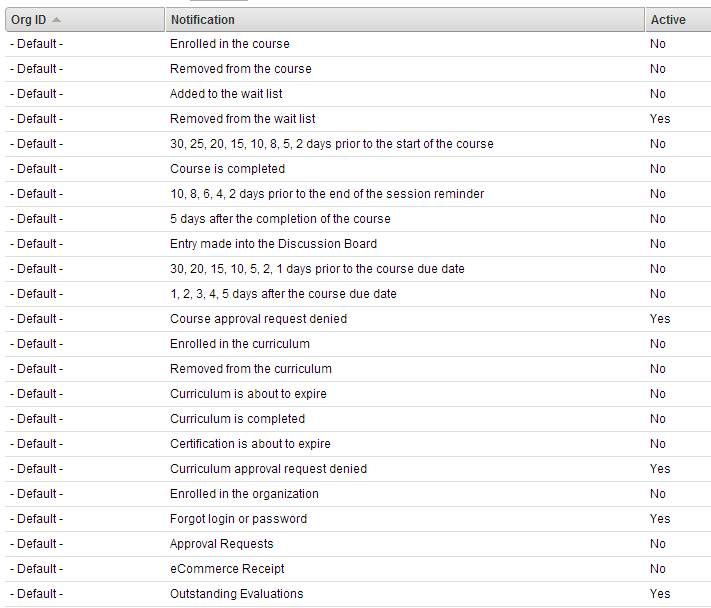
Important: When you set a template/default notification to Active, the same notification becomes active for any new organization, course, curriculum, or session. For example, if the Course approval request denied notification is made Active, any time a new course is created, this notification for that course is also made active. If there is a course in that organization for which you do not want the notification to be active, you must change that specific course's notification.
System variables
<#START_DATE#>– Start date of the course or curriculum<#END_DATE#>– End date of the course or curriculum<#LOCATION#>– Location of the course or curriculum<#LOCATION_DESCRIPTION#>– The description of the location<#COURSE_NAME#>– Name of the course<#CURRICULUM_NAME#>– Name of the curriculum<#SESSION_NAME#>– Name of the session<#INSTRUCTOR_NAME#>– Name of the instructor<#USER_ID#>– Student’s user ID<#USER_FIRSTNAME#>– Student’s first name<#USER_LASTNAME#>– Student’s last name<#USER_FULLNAME#>– Student’s full name<#USER_PASSWORD#>– Student’s password<#USER_SUBORG0#>thru<#USER_SUBORG15#>– Defined sub-org values<#USER_PERSINFO0#>thru<#USER_PERSINFO7#>– Defined user definition values<#APPROVER_NAME#>– Name of the person that approved the student<#DENIED_COMMENT#>– Comment provided for denied approval<#CM_LINK#>– CourseMill Log-in URL<#MEETING_DAYS#>– Days of the week that the session meets<#START_TIME#>– Session start time<#END_TIME#>– Session end time<#COURSE_NOTES#>– Course notes<#COURSE_DESC#>– Course description<#COURSE_LAUNCH#>– URL that allows the student to log-in. When the student is logged in, the course is automatically launched. This is encrypted to protect the username and password.<#SESSION_NOTES#>– Session notes<#WAITLIST_POSITION#>– Position on the waitlist, if enabled<#CREDIT_HOURS#>– Number of credit hours earned<#COMPLETION_DATE#>– Course completion date<#DUE_DATE#>– Course due date<#DB_NAME#>– Database name<#TOPIC_NAME#>– Discussion board topic name<#TOPIC_ENTRY#>– Discussion board topic entry<#TOPIC_POSTER#>– Name of the discussion board topic poster<#SCORE#>– Score for the course<#PURCHASE_DATE#>– Date of purchasing the course<#FOREACHITEM#>– Number of items purchased<#CATALOG_TYPE#>– Type of course catalog<#CLASS_SIZE#>– Student Limit for the associated Session