![IntranetHeader_Logo.png]](https://knowledgebase.elblearning.com/hs-fs/hubfs/IntranetHeader_Logo.png?height=40&name=IntranetHeader_Logo.png)
April 26, 2022
Add a User
Step 1: Admin Section
To begin, navigate to the Admin section.
Step 2: Create Scenario
Under the Users or Subscriptions tab, click Add Users.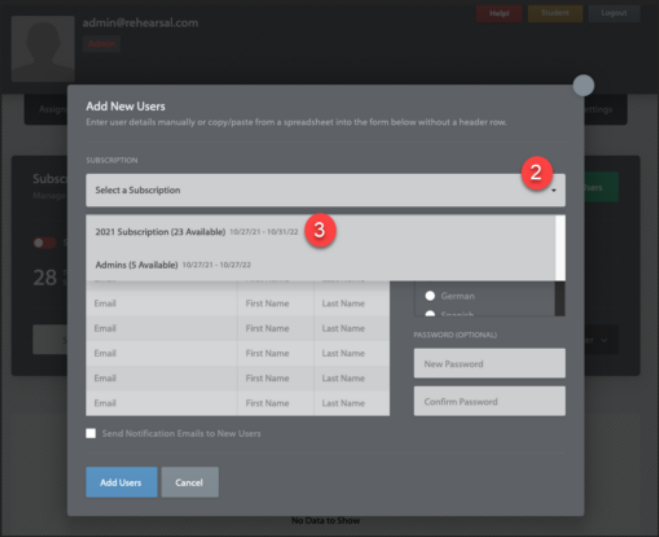
Step 3: Select Subscription
Next, from the drop-down menu that appears, select a subscription to add the user to.
There must be available seats within the selected subscription.
Step 4: Enter Details
Fill in the user’s email address, first, and last name.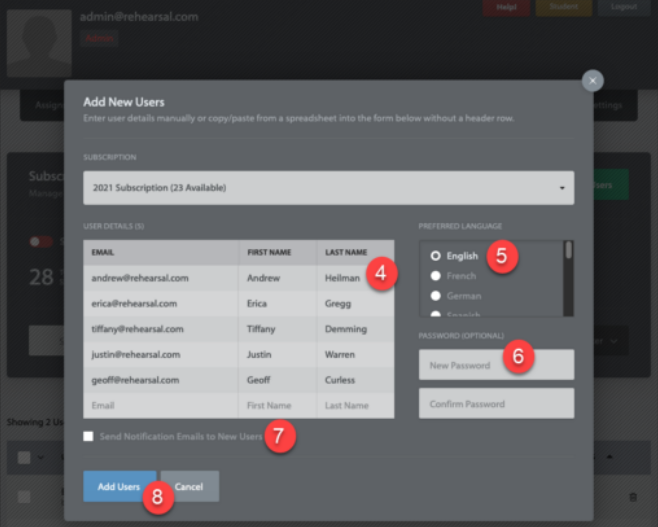
Step 5: Select Language
Select the preferred language for the user(s).
Step 6: Set Password
Optionally set an initial password for the user(s) being added.
Step 7: Notifications
If desired, check the box to send notification emails to the new user(s).
Step 8: Complete
Click the Add Users button.