
One of the first steps in CourseMill is setting up your organization. Everything you set up from that point on depends on the organization you are working with, so it is important to understand what an organization means in CourseMill and how you work within it.
All of your users can be categorized into one or more independent organizations, which simply represent an independent group of users within your company. The organizations that you set up define a particular group of users within your company that you want to provide training for, specific to that organization. For example, if training will be set up differently for sales as opposed to manufacturing, set up those organizations independently of each other. Each of those organizations would have their own set of courses, their own instructors, and maybe their own CourseMill administrators.
Plan your organizations
How you set up your organizations from the beginning is very important. Start by asking yourself these questions:
- Are we setting up training for third parties? For example: different customers who have different needs, different types of agencies, or different types of users regulated in different ways?
- Will your company require any security restrictions between different parts of the company? Or will you allow every student in your company to see everything on the site?
- Will the company need several administrators to handle the volume of users and special requests?
- Do different parts of the company want to have their own News section addressing their specific users?
- Will one part of the organization be able to allow students to self-register, while another part mirrors its users with a HRIS or ERP system?
- Will you have courses that need to span multiple organizations? If so, each course will need to be loaded into each organization with a unique name.
- Will only certain students be allowed community board access (chat/discussion boards)?
If you answered yes to any of these questions, you will most likely want to set up more than one Organization.
You can further define an organization by using SubOrgs. However, numerous configurations relating to the questions above can be set up on the organization level only.
Examples of organization structures
These examples show companies that set up various numbers of organizations and why they set them up that way.
ACME Call-A-Nurse (small number of users)
Businesses with only a small number of users in their CourseMill system will typically set up only one overall organization. For example, ACME Call-A-Nurse is a small company that dispatches nurses to people's homes for medical assistance. Being in the Healthcare business, they require each nurse to continually take training and become certified in order to pass government regulations. They have approximately 200 nurses in the field that will be expected to take online training through CourseMill.
Their organization will be called CallaNurse and there will be one administrator handling all the course and user input. Everyone that is set up by the administrator as a student will have access to all courses in the catalog and will be able to chat with anyone else in that course. The administrator will easily be able to send mass emails out to all students registered in the organization, announcing a new course.
They do have various levels of nurses (STNA, LPN's, RNs, etc.) which may require different levels of training. These nurses are assigned to serve in different parts of the city. The use of sub-orgs (described below) could further define these factors for reporting and enrolling.
ACME Family Safe (medium number of users)
Businesses that have a medium amount of users in their CourseMill system may set up several organizations. ACME Family Safe is a medium business that has several divisions. One division is similar to ACME Call-A-Nurse in that it employs 1200 nurses in a 5 state region that are dispatched out to the field. Another division carries products that are used for home safety, like security systems, pill dispensers, and health monitoring equipment. This division has 500 sales people across all 50 states. A third division is a remodeling division that provides construction service for home remodeling (putting in elevators, etc.). This division has 100 full-time employees and many times 2000 contractors on payroll at any one point in time.
Each division is run totally differently with different levels of required certifications. The manager of each division wants to set up and run the administration in their own way, have their own news, and create various types of reporting.
In this case they have set up three organizations: FS-Nurse, FS-Safety, and FS-Home.
ACME Healthy Advisors (large number of users)
Businesses that will have a large amount of users in their CourseMill system may set up a large amount of organizations. ACME Healthy Advisors is a service company that provides training to 10,000 customers worldwide across various topics. Each customer will have its own particular training needs and each customer will be in charge of managing its own student database. Some customers will be charging for courses that students take and others will not.
Since each customer may have their own requirements, ACME Healthy Advisors is setting up a unique organization for each customer. Therefore ACME Healthy Advisors will have one overall administrator, but then each customer will have their own administrator managing their own courses and requests.
Further define your organization with SubOrgs
Once you set up your organizations, you may want to further break an organization down to allow an administrator or instructor to mass-enroll all students in a particular part of that organization. Alternatively, when you create reports, you may only want to report on a particular part of your organization.
In CourseMill, an organization can be categorized into 16 different categories (SubOrg 0 through SubOrg 15). The following example shows an organization broken down into two sub-categories: Department and Team.
- SubOrg 0 = Department. Possible values:
- Development
- Management
- Marketing
- Sales
- Training
- SubOrg 1 = Team. Possible values:
- Development: Product 1, Product 2, Product 3
- Management: (none)
- Marketing: Print, Social, Web
- Sales: Region 1, Region 2, Region 3
- Training: (none)
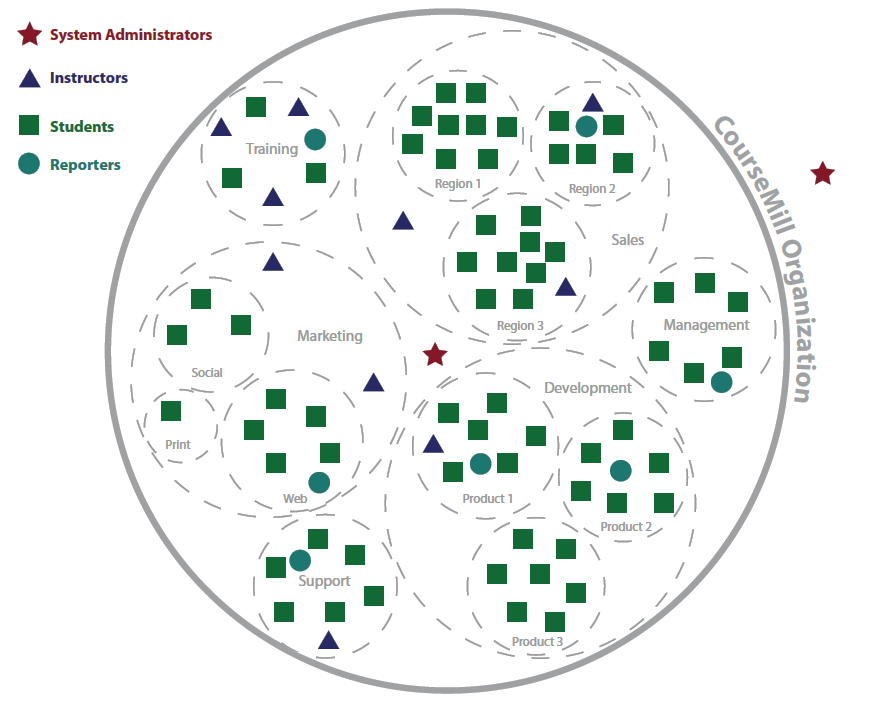
The diagram also shows the four types of users (administrators, instructors, reporters, and students) that are defined in an organization. See Administrator and user roles for more information.
Users spanning multiple organizations
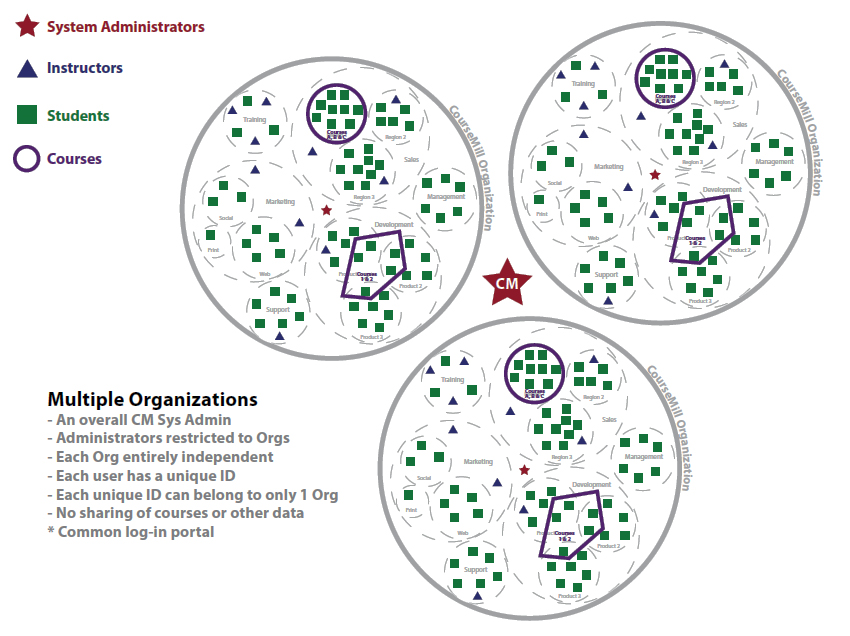
When you have multiple organizations within your CourseMill system, you may have a user that needs access to numerous organizations. CourseMill's rule is that each user's unique ID can belong to only one organization. If a user needs access to more than one organization, you can create multiple user IDs for that user. For example: JohnDoe-Sales and JohnDoe-Training.
Limitations and advantages of multiple organizations
- User names have to be unique within the entire CourseMill site. For example, a user ID of "Tom.Jones" in one organization could be "Tom.Jones1" in another organization.
- All reporting within an organization only pulls data for that organization. Reports cannot include data from multiple organizations (unless you are a global administrator).
- Course IDs have to be unique within the entire CourseMill site. For example, a course ID of "Acctg101" in one organization could be "Acctg101A" in another organization.
- Each unique organization can be configured in a completely different way than the others.
- Each unique organization can have its own set of curriculums, courses, sessions, logo for branding, and News page.
- There is added security when a user in one organization cannot see anything in another organization. All data is secure within the organization and cannot cross organizations.
Add an organization
After logging in as an administrator, use the Add Organization button on the Manage Orgs tab to add a new organization to your CourseMill system. When adding an organization, you define the organization details by filling in data in various tabs. For details, see Adding an organization.
Use the SubOrg tabs
In addition to the organization that you have set up, you can further define organizations by setting up to 16 suborgs (0 to 7 on the first tab, and 8 to 15 on the second tab). Creating and defining suborgs enables you to categorize the various users inside an organization. For example, you may want to categorize the users in your system by Division, Region, Department, Geographical Location, Job Title, or some other category based on the overall structure of the users in the system. Using suborgs to further define categories of users has these advantages:
- You can generate reports with data pertaining to a specific suborg category of users.
- You can assign courses and curriculums to entire groups of people, using the suborg selection.
- Administrators and instructors can easily generate emails addressed to an entire suborg group.
Note: When creating suborgs, do not skip a suborg in the sequence. CourseMill stops reading the organizational categories at the first blank.
Note: It is best to establish all suborgs prior to adding users to your organization. This ensures that all users are classified properly in the system. If you do not, there are ways to reclassify users, but it will take some time on your part. See Setting SubOrg values.
Sample: SubOrg dependency
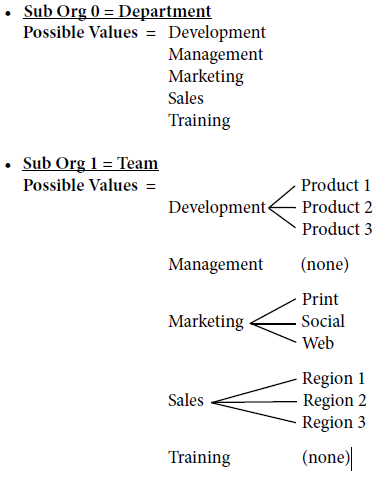
In the sample diagram, if the user's profile indicates that the user belongs to the Marketing Department, then he or she can further belong only to the Print, Social, or Web Teams.
For more information about setting suborg values, see Setting SubOrg values.
Related articles